

Dear subscribers,
Today, I want to share a new episode with Moritz Kremb.
Moritz is an AI creator who built a personal OS in Claude Code to manage his emails, create content, and even buy groceries. In this episode, he walks through everything you need to set up your own: folder structure, tools, memory loops, skills, and routines. We also talked about the pros and cons of OpenClaw vs. Claude Code.
Watch now on YouTube, Apple, and Spotify.
Moritz and I talked about:
(00:00) The honest tradeoffs: OpenClaw vs. Claude Code
(09:03) The reliability problem that made Moritz switch
(15:40) The folder structure that runs Moritz's entire OS
(20:03) The memory loop that makes Claude Code remember everything
(23:47) CLI vs. MCP vs. API: which to pick and why it matters
(26:02) Skills walkthrough: automated grocery runs and video uploads
(29:03) Local vs. remote routines (and when to use each)
(31:51) The full content pipeline from idea to posted video
(41:43) Tips to start building your first personal OS
I’m proud to partner with Linear

As teams ship faster with AI agents, the bottleneck shifts from building to deciding what to build.
Linear’s new Agent understands your full workspace context: roadmap, issues, customer requests, and code. Ask it to surface patterns across feedback, scope out a spec, or catch you up on team progress.
Top 10 takeaways I learned from this episode
Build your Claude Code personal OS in 4 layers. Moritz runs his email, content pipeline, and grocery shopping through his Claude Code OS. It has 4 layers:
Folder (with memory): A set of files Claude Code reads at the start of every session so it knows who you are, what tools it has, and what it remembers from past chats.
Tools: The APIs, MCPs, and CLIs that let Claude complete tasks like send emails, post to social, search Google Drive, and more.
Skills: Detailed instructions for tasks that Moritz does over and over like “upload my video files” or “refill my grocery cart.”
Routines: Scheduled jobs that run proactively.
Let's walk through how to set up each layer below:
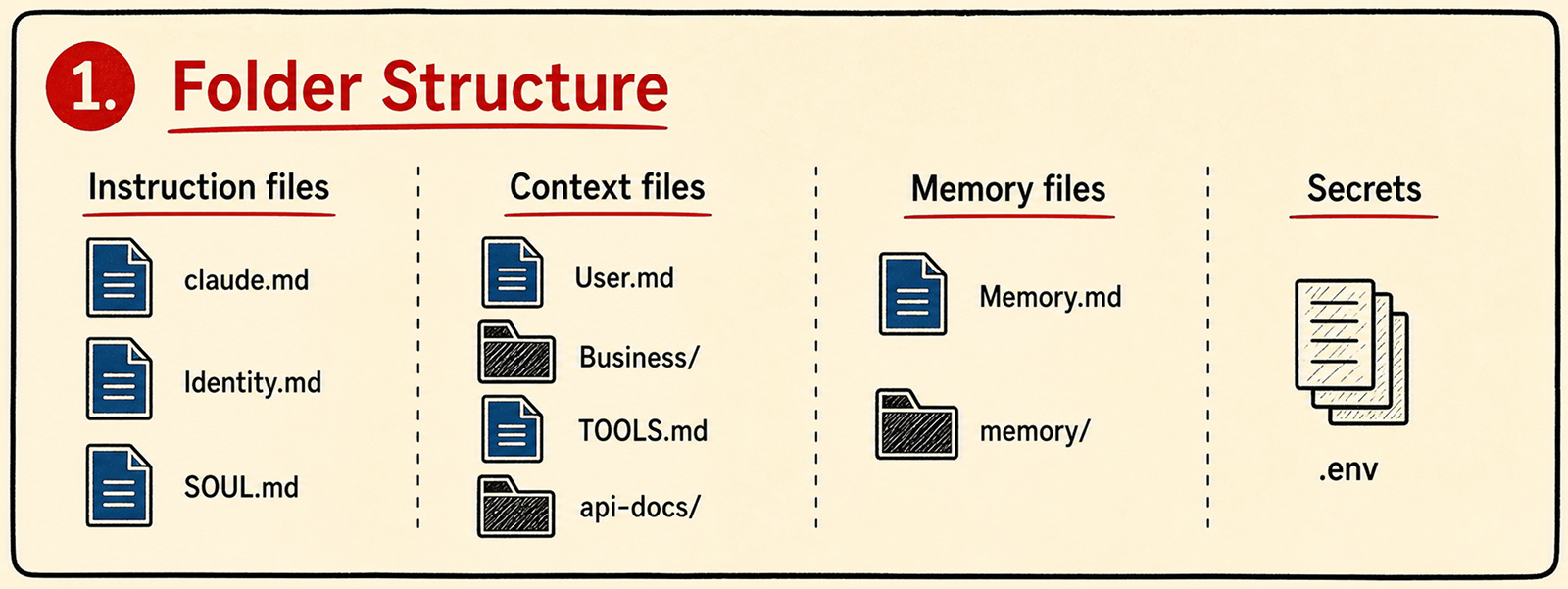
Set up your folder structure first. Get this right before setting up tools or skills so that your OS stays organized. Critical files include: