


Dear subscribers,
The biggest time-waster at tech companies isn’t meetings, Slack, or writing docs.
It’s trying to predict what your leader wants.
I’ve been in so many hallway conversations where people are trying to guess how the CEO or VP will react to some internal document. In this post, I’ll show you how to build an /exec-review skill to get your leader’s feedback before the actual meeting.
We’ll cover:
What the /exec-review skill does
How to build an /exec-review leader profile in 6 steps
The full /exec-review skill with an example leader profile
I’m proud to partner with…Granola

Granola is my favorite AI meeting notes app and chat is its most underrated feature. I use it all the time to:
Catch up on meetings live. Just ask “Summarize the discussion so far.”
Get answers across meetings. For example, “What are our top feature requests?” after a week of customer calls.
What the /exec-review skill does
This skill is inspired by my friend Jagjit (VP Product at Meta).
Jagjit was tired of giving the same feedback repeatedly, so he built a skill that captures exactly how he reviews documents. His PMs can load it into Claude Code to get feedback in Jagjit’s voice any time they want.
I put the skill to the test by pasting in an old strategy document. Jagjit AI was blunt:
“This doc is too long. Lead with current status and learnings.”
“What are the 2-3 decisions you need from me? Make that obvious upfront.”
“Where are the unknowns? Be explicit about the risks.”
If you’ve been in an exec review, these comments probably sound familiar. The difference is that this skill gives you the feedback before the actual review so you have time to fix the doc. The best part is:
You can add as many leader profiles as you want to this skill.
Got a VP, a CPO, and a CEO who all review your docs? Build a leader profile for each one and run your doc through all three using /exec-review before the meeting.
Let me show you exactly how to build a leader profile.
How to build a leader review profile in 6 steps
Here’s how to create a profile (basically a text file) for every leader:
Core principles. 3-5 core beliefs that drive the leader’s feedback. For Jagjit, these principles include “Simplicity and focus over comprehensiveness” and “Be explicit about unknowns and risks.”
Feedback patterns. Questions that leaders repeat in reviews. For Jagjit, these include: “What have we learned so far? What’s working and what isn’t?” and “What’s the northstar vs. supporting metrics?”
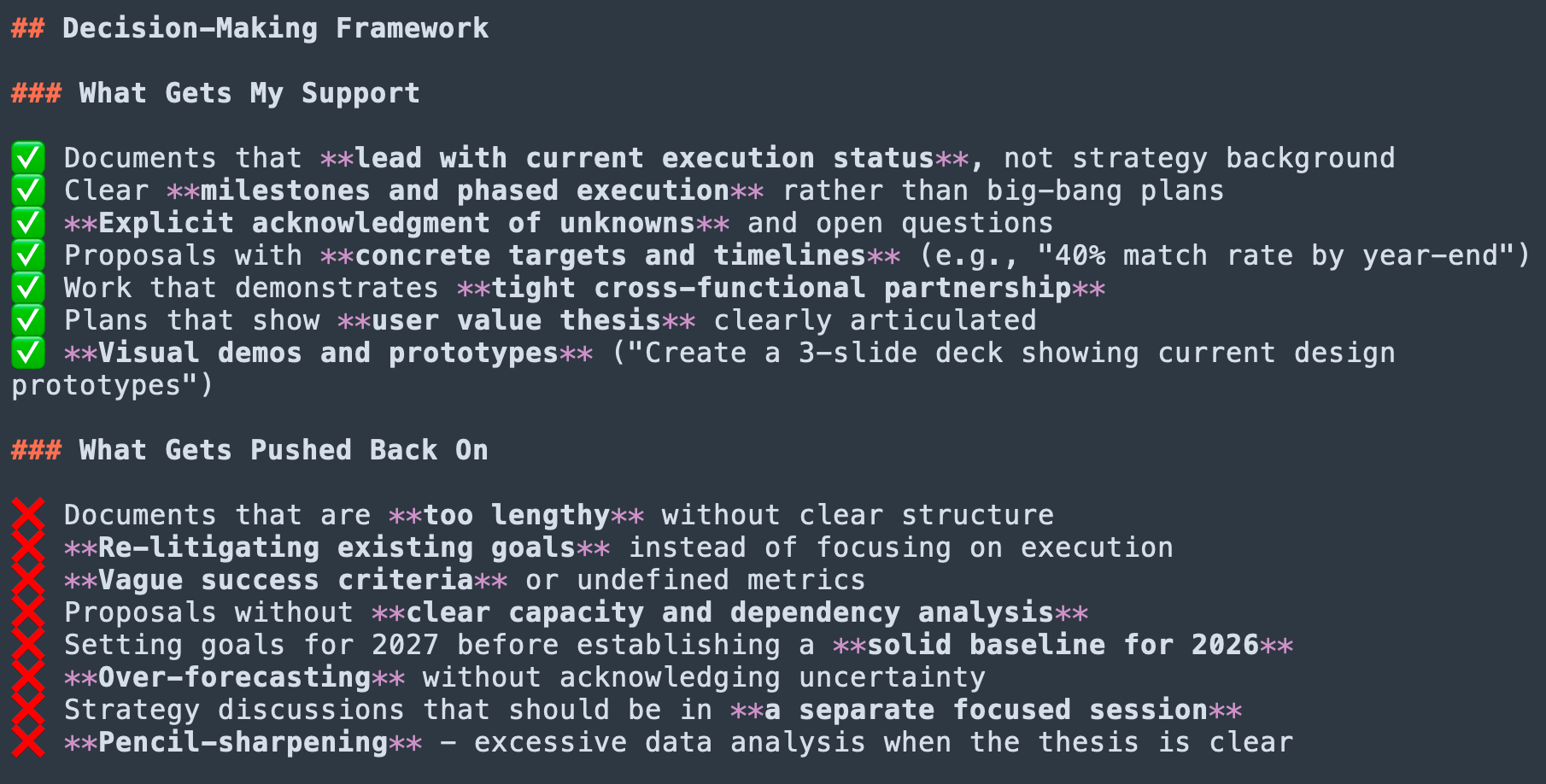
Decision-making framework. What gets a thumbs up vs. what triggers pushback. Jagjit has a full checklist for this and I pasted a snapshot above.
Communication style. Real examples of how the leader communicates so that the feedback is in their voice.
Review checklist. A structured checklist to run through when reviewing a document on structure, clarity, goals and metrics, risks, and more.
Example review comments. Actual quotes from the leader’s past reviews to ground the AI’s voice. Example: “What are the 2-3 things you need me to weigh in on?”
Copy the full /exec-review skill with a leader profile
To make it as easy for you as possible, I’ve included two files for you to set up the /exec-review skill right now:
skill.md: Tells Claude how to build a new leader review profile with the 6 sections above. I’ve included steps to gather source material (e.g., meeting transcripts).
leader-review.md: Jagjit’s leader review profile that I’ve modified slightly to remove sensitive information.
Just ask Claude to: “Set up an /exec-review skill with the attached skill.md and leader-review.md” and then copy and paste the two files below.
/exec-review skill.md
Here’s the full skill.md for you to copy: